Mobile commerce now accounts for the majority of e-commerce traffic in most markets — and in many categories, it drives more than half of all revenue. Your customers are shopping on their phones during commutes, on their lunch breaks, and after work from their couches. If your mobile experience isn’t meeting them there, a competitor’s app is.
This dynamic has dramatically raised the bar for e-commerce app development services, along with the level of mobile engineering expertise required to deliver a competitive experience. Customers no longer evaluate mobile experiences only against direct competitors. They compare them to the best digital products they use every day — from Amazon and Nike to Starbucks. Expectations around speed, personalization, and checkout friction are shaped by those experiences, not by category benchmarks.
As a result, decisions around architecture, platform strategy, and feature prioritization now sit much closer to core business strategy. These are no longer purely technical considerations. Increasingly, they shape long-term cost structures, scalability, and customer experience outcomes.
This guide is for e-commerce entrepreneurs and executives responsible for those decisions: the VP of Digital evaluating architecture choices, the CEO considering platform strategy, or the CTO defining scope and investment. Consider it a practical decision-making resource covering what you are building, what it will cost, what can go wrong, and how to approach the tradeoffs that matter most.
What e-commerce app development actually involves
E-commerce app development is the process of designing, building, testing, launching, and maintaining digital storefronts that let customers discover products, complete purchases, and manage their orders. It involves decisions across three dimensions: which features to build, which technology and architecture to use, and how to build it (i.e., via a platform, framework, or fully custom development).
Those three dimensions are interconnected. A feature decision (say, supporting multi-currency checkout) has architectural implications (real-time tax calculation, exchange rate APIs, currency-specific payment methods). An architecture decision (microservices vs. modular monolith) affects how fast your team can ship new features. A build approach decision (Shopify vs. custom) determines how much flexibility you have in all of the above.
This is why decisions made early in a build tend to compound, affecting costs, timelines, user experience, and e-commerce outcomes.
Types of e-commerce apps by market model
The market model you operate under shapes your entire feature set — B2B and C2C apps, for instance, look almost nothing like a standard B2C storefront. Getting your model defined early prevents costly assumptions from making it into your architecture.
- B2C (Business-to-Consumer) is the most common model. You’re selling directly to end customers, and the primary design goal is conversion: get the right shopper to the right product with the least friction. Most of the UX conventions shoppers expect — product recommendations, wishlists, guest checkout — originate in B2C apps.
- B2B (Business-to-Business) is more complex than it looks. Buyers typically need account hierarchies, negotiated pricing tiers, bulk ordering, and multi-step approval workflows. A procurement manager at a mid-sized company may need to request a quote, get sign-off from a budget holder, and route the order through a specific account — none of which maps to a standard B2C checkout flow.
- C2C (Consumer-to-Consumer) platforms, like marketplaces, require seller tooling, trust mechanisms (ratings, reviews, identity verification), and escrow or managed payments to protect both parties. The complexity isn’t in the buyer experience — it’s in what you build for sellers and in how you manage the relationship between them.
- C2B (Consumer-to-Business) reverses the model: individuals offer services or content to companies. Think freelance platforms, influencer marketplaces, or stock content licensing. Pricing, rights management, and reverse discovery (businesses finding the right individual) become the core design challenges.
- Aggregators (e.g., platforms like Instacart or DoorDash) aggregate inventory from multiple vendors and offer a unified discovery and checkout experience. The complexity here is in real-time inventory synchronization across vendors, flexible fulfillment routing, and the operational infrastructure that sits behind a “single” checkout.
Your market model determines which functionality is non-negotiable, which is nice-to-have, and which doesn’t apply at all.
Types of e-commerce applications by app development approaches
Whereas market models impact feature selection, delivery models or app development approaches dictate whether you can build these features. In this respect, e-commerce apps fall into one of four categories: native, cross-platform, hybrid, and progressive web apps.
Native apps
Native apps (built in Swift for iOS or Kotlin for Android) deliver the best performance and the deepest integration with device capabilities, including camera, on-device AI, biometrics, haptics, push notifications.
These advantages come at the steep cost of developing and maintaining two separate codebases for iOS and Android. As a result, companies need to carefully weigh if the native functionality and performance are truly worth the extra time, effort, and money.
Cross-platform apps
Cross-platform apps (Flutter, React Native, Kotlin Multiplatform) let a single development team build for both iOS and Android, with up to 80–90% of code reused between platforms. Performance is close to native for most e-commerce use cases, and the productivity gains are real. Most mid-market e-commerce companies building their first serious app start here.
Hybrid apps
Hybrid apps (Ionic, Capacitor, Cordova) wrap a web-based UI (e.g., React.js, Angular, Vue.js) inside a native shell, allowing distribution through the App Store and Google Play with access to device APIs. They were a popular middle ground a few years ago, but Flutter and React Native have matured to the point where they deliver near-native performance at comparable development cost — making hybrid frameworks hard to justify.
Progressive Web Apps
Progressive Web Apps (PWAs) are, essentially, websites engineered to behave like apps — installable from the browser and capable of some offline functionality. They work well for businesses that need a fast mobile web experience without the friction of an App Store install. The tradeoffs are real, though: PWAs have limited access to native push notifications, can’t be distributed through the App Store or Google Play, and offer weaker offline capabilities and functionality than a native or cross-platform app.
Build approach (your most consequential decision)
The app type question and the build approach question are closely related — your choice of native, cross-platform, or web-based shapes which of the following four paths makes sense.
Option 1: SaaS platform (Shopify, BigCommerce, WooCommerce)
- Best for: businesses wanting to launch quickly, stores with standard feature requirements, teams without dedicated engineering capacity
- Timeline: 4–12 weeks for a complete store with custom design and basic integrations
- Cost range: $3,000–$40,000 in development fees, plus $29–$299/month in platform fees
SaaS platforms give you a pre-built commerce engine — catalog, cart, checkout, payments, order management — that your team configures rather than constructs. You’re buying speed and operational simplicity in exchange for working within platform constraints.
Platform lock-in becomes a real conversation at a certain scale. Subscription and transaction fees compound as revenue grows, the codebase isn’t yours to modify, and deep customizations often require workarounds that accumulate technical debt.
On mobile, the default experience is a responsive web storefront. It’s not a native app, but most platforms support PWA configuration. Shopify, for example, allows themes to be set up as PWAs via theme code edits or third-party apps like AmpifyMe. Customers can then install the store on their home screen and receive push notifications.
For a true App Store-distributed app, the lighter-touch route is a no-code builder like Tapcart or Plobal Apps. These tools wrap your storefront in an app shell — fast to launch, but limited in design flexibility. The more flexible option is a custom mobile frontend built against the platform’s API, which is what Option 2 covers.
Option 2: Custom build on an open framework
- Best for: mid-market retailers with specific UX requirements, businesses needing custom functionality beyond platform capabilities
- Timeline: 12–24 weeks depending on scope and design complexity
- Cost range: $25,000–$120,000 depending on feature scope
This path uses an open-source or headless commerce backend (e.g., Medusa.js, Commerce.js, or headless Shopify) with a custom frontend. Common stacks pair a React or Vue-based frontend — Next.js and Nuxt.js being the most widely adopted — with one of these backends.
Think of this approach as a middle path: teams get significantly more design and feature flexibility than a platform allows, without the cost and risk of building everything from scratch. Whether the work happens in-house or with a development partner depends on engineering capacity, not on any constraint of the approach.
Option 3: Fully custom build
- Best for: enterprise retailers, marketplaces, businesses with unique product or checkout flows
- Timeline: 6–18 months for a production-grade application
- Cost range: $80,000–$300,000+ for the initial build
A fully custom build means owning the entire stack — database schema, API layer, admin interface, and everything in between. Every feature is built to specification. It’s the most expensive and highest-risk path, but also the most capable for businesses with requirements no platform or framework can satisfy, or where transaction fee savings at scale justify the investment.
Option 4: Hybrid migration
Many companies launch on a SaaS platform to reach the market quickly, then migrate to a headless or custom build as the business grows. Getting to market matters more than having a perfect architecture from day one.
Benefits of e-commerce apps vs. mobile websites
Mobile devices now generate roughly 78% of e-commerce traffic, making mobile experience quality a direct revenue concern. Desktop still delivers the highest conversion rates at approximately 3.9%, but e-commerce apps significantly outperform mobile websites, converting at around 3.5% compared to 2.85% on mobile web.
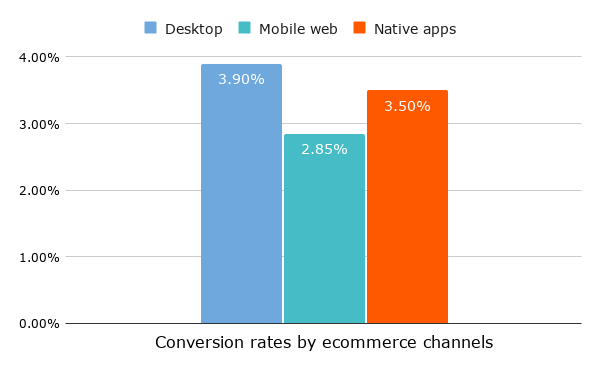
Several factors underlie this difference. Apps reduce friction by keeping customers signed in, storing payment details, and enabling faster checkout. They also support capabilities that mobile websites struggle to replicate, including push notifications, loyalty program integration, offline functionality, and deeper personalization based on customer behavior. For businesses focused on repeat purchases, these advantages often translate into higher retention, purchase frequency, and customer lifetime value (CLV).
Brand examples — what good looks like
Major brands offer useful reference points for what e-commerce apps can accomplish when built around a clear strategic intent.
H&M: reduce friction across the purchase journey
H&M built an e-commerce app that combines product discovery, wishlists, loyalty benefits, and checkout into a single cohesive experience. The lesson here isn’t that customers want more features. It’s that every step between discovery and purchase should feel connected. When browsing, saving, redeeming rewards, and checking out happen seamlessly, customers are more likely to return.
Sephora: make loyalty part of the core experience
Sephora made the loyalty program the app’s primary value driver. Shoppers can track points, unlock exclusive offers, and manage their beauty profile in one place. The result is a self-reinforcing loop: engagement increases personalization, which increases engagement.
Amazon: treat accessibility as a growth lever
Amazon treats accessibility as a first-class design requirement. Building for customers with visual impairments, motor limitations, and cognitive differences isn’t just the right thing to do — it consistently improves the experience for everyone.
Starbucks: turn convenience into retention
Starbucks demonstrates how operational features can become retention drivers. Mobile ordering, integrated payments, and rewards work together to make repeat purchases effortless. Customers return not because the app is novel, but because it consistently saves them time.
Nike: build a relationship beyond transactions
Nike uses its app ecosystem to create value that extends beyond product purchases. Exclusive product launches, fitness content, community participation, and member benefits encourage customers to engage with the brand between purchases. The result is stronger loyalty and more opportunities to drive long-term customer value.
The common thread here is that e-commerce leaders don’t compete by offering the longest feature list. Each built its mobile strategy around a specific objective: reducing friction, strengthening loyalty, improving accessibility, increasing convenience, or building community. The most successful e-commerce apps tend to follow the same pattern of identifying clear, relevant business objectives and using technology to reach them.
Features — what you’re actually building
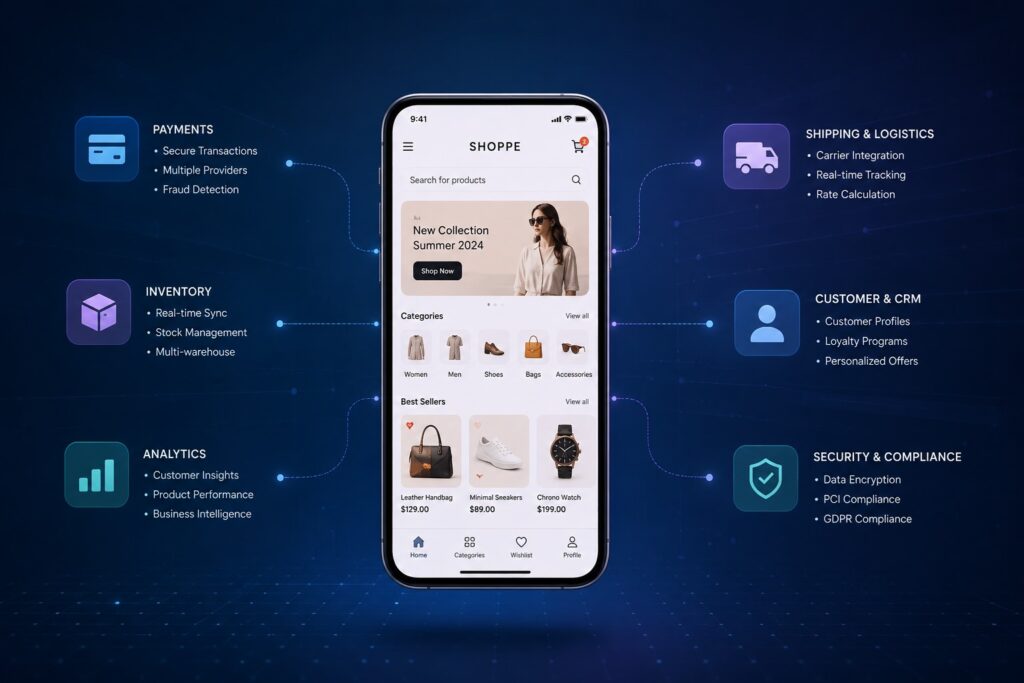
E-commerce application development involves much more than building a storefront or checkout flow. In practice, it’s the construction of interconnected systems that power discovery, purchase, fulfillment, and post-purchase experiences at scale.
To understand what you’re actually building, it helps to break it down into three layers: core infrastructure, customer-facing features, and internal tools. We’ll also look at innovative features that still serve as meaningful differentiators in today’s competitive landscape.
Core infrastructure features
These systems sit beneath everything customers see. They rarely get discussed in product meetings, but they’re what determine whether your app scales, stays consistent, and recovers gracefully when something goes wrong.
- Product and catalog data model. Your catalog schema is a long-term commitment. Attribute models need to flex across product types — a shoe and a subscription box have almost nothing in common structurally. The schema should support variant dimensions (size, color, material), per-SKU (stock keeping unit) inventory by location, multi-tier pricing (base, promotional, volume, account-specific), and continuous sync with your search index. Retrofitting a rigid schema later is one of the more expensive problems in e-commerce mobile app development.
- Order management system. Every order is a financial and operational record. The data model needs to preserve pricing at the moment of purchase (independent of catalog changes), reference payment gateway transactions, track fulfillment and shipment events, and maintain a full audit log. Gaps at this stage become support and accounting problems down the line.
- Customer and identity system. The identity layer is what connects a shopper across sessions, devices, marketing touchpoints, and service interactions. It handles authentication mechanics, stores address books and order history, carries segmentation attributes for downstream marketing tools, and manages consent records and privacy request workflows.
- Payments and risk infrastructure. This layer covers gateway and processor selection (Stripe, Adyen, Braintree), 3D Secure (3DS) integration, device fingerprinting, velocity checks, fraud tooling, and chargeback workflows. Routing card data through gateway tokenization rather than handling it directly narrows Payment Card Industry Data Security Standard (PCI DSS) scope considerably — worth deciding before any payment code is written.
- Tax and shipping integrations. Tax calculation and shipping need to be accurate in real time, not approximate. An incorrect tax rate at checkout erodes trust; a wrong shipping estimate creates post-purchase friction. Use purpose-built services (Avalara for tax; carrier APIs or aggregators for shipping) rather than home-grown logic.
Data warehouse and event streaming. Behavioral event data that reflects what customers browse, add, abandon, and buy is the raw material for attribution analysis, cohort segmentation, and lifetime value (LTV) modeling. Streaming this to a warehouse from day one means your analytics capabilities compound over time rather than starting from zero when you eventually need them.
Customer-facing features
These are the touchpoints your shoppers interact with directly — from discovery through post-purchase. Getting them right drives conversion; getting them wrong drives churn.
- Onboarding and registration. The sign-up flow is a first impression. Social login, email and phone registration, and guest checkout each serve different customer preferences. Multi-factor authentication (MFA) protects accounts without adding excessive friction for new users. The fewer steps between landing and first purchase, the better.
- Search and discovery. Shoppers who search convert at significantly higher rates than those who browse — making search one of the highest-leverage investments in any e-commerce build. A well-tuned implementation covers synonym expansion, typo correction, filter and facet logic, autocomplete, personalized rankings, and suggestions informed by purchase and browse history. Fashion and home categories should also consider image-based search.
- Product pages. The product detail page is where purchase decisions are made. Rich media (multi-angle images, video, zoom), variant selectors, live inventory status, delivery date estimates, and social proof signals (reviews, Q&A) all contribute to conversion. Anything that creates uncertainty or extra steps at this stage costs sales.
- Customer reviews, ratings, and Q&A. Shoppers rely on peer input to validate purchase decisions, particularly for unfamiliar products. To support this, the system needs review submission, moderation queues, verified purchase attribution, and helpfulness ranking. Q&A threads also reduce inbound support volume on common product questions.
- Social sharing and social commerce. Organic sharing extends reach without paid acquisition spend. For brands targeting younger demographics, deeper social commerce integrations — shoppable posts, native TikTok or Instagram checkout — are increasingly worth the engineering investment.
- Cart and checkout. The checkout flow is where revenue either completes or evaporates. Persistent cart (across sessions and devices) and broad payment method coverage — cards, digital wallets, Buy Now Pay Later (BNPL), and regional options — are both expected. So are voucher and gift card application and real-time shipping cost display. Requiring account creation before checkout still kills conversion, which makes guest checkout a must-have.
- Order tracking and returns. Post-purchase anxiety is a real phenomenon. Real-time status visibility, proactive notifications at key shipment milestones, and a self-service return flow that doesn’t require a phone call all reduce support load while improving satisfaction.
- Push notifications and messaging. Transactional messages (confirmation, dispatch, delivery) are assumed. Promotional messages require restraint — customers who feel over-messaged opt out permanently. Per-user frequency preferences and quiet hours should be built in, not bolted on later.
- Loyalty, coupons, and referrals. A well-structured loyalty program creates habitual purchasing. The mechanics (e.g., points, tiers, redemption thresholds, referral rewards) need to be simple enough that customers understand them without reading documentation. Complexity here is a program killer.
- Customer support. The baseline is live chat, a searchable knowledge base, and context-sensitive help surfaced within relevant app flows. AI-powered first response handles high-volume, repetitive queries and routes complex ones to human agents. The goal is resolution without escalation.
- Localization. Expanding into new markets means adapting more than copy. Currency display, unit conventions, right-to-left script rendering, country-specific address formats, regional date standards, and locally relevant catalog content all require explicit engineering work. None of this happens automatically.
Local commerce and omnichannel features. Physical retailers need the digital app to connect with store operations. Buy Online, Pick Up In Store (BOPIS), click-and-collect, in-store reservation, and live store locators all require accurate, near-real-time inventory data at the location level. That data problem is typically more complex than the app features themselves.
Admin features
These are the tools your internal teams rely on day-to-day to manage inventory, orders, promotions, and everything in between.
- Product and catalog management. The merchandising team shouldn’t need engineering support to manage the catalog. Bulk import and export, inline editing, media management, and taxonomy tools should all be accessible in the admin UI.
- Inventory management. Multi-location stock visibility, low-inventory alerts, and reorder tracking form the operational core. AI-driven demand forecasting and automated replenishment suggestions add meaningful value for businesses with seasonal patterns or large SKU counts.
- Order management. The operations team needs full order lifecycle control: search and filter, fulfillment actions, partial shipments, exception handling, refunds, and return merchandise authorization (RMA) initiation — all without developer involvement.
- User management. Role-based permissions ensure the right people access the right data. A support rep needs order history and the ability to initiate a return. They shouldn’t be able to edit pricing or pull financial reports.
- Discount and promotions management. Marketing teams need to build, schedule, and retire promotions on their own timeline. The system should handle percentage and fixed discounts, cart-level rules, minimum order thresholds, and single-use or bulk promo codes.
- Vendor management. Drop-ship suppliers, fulfillment partners, and promotional agencies each have distinct operational relationships and data formats. A vendor layer manages onboarding, product feed ingestion, and the communication workflows that keep those relationships running.
- Reporting and analytics. Standard dashboards covering revenue, conversion, average order value (AOV), repeat purchase rate, and inventory turnover give operators the visibility they need day-to-day. Predictive layers (e.g., demand forecasting, churn risk scoring, LTV projection) add value once sufficient transaction history exists.
Customer relationship management (CRM), customer data platform (CDP), and marketing integrations. A CRM handles service interactions; a CDP resolves customer identity across touchpoints and feeds segmentation into marketing tools. Connecting these to your app’s behavioral data is what allows lifecycle messaging and UX/UI tweaks to be based on what customers actually do rather than demographic proxies.
Innovative features that can still differentiate
Most e-commerce apps offer the same core experience. The features below remain uncommon enough to create real competitive separation.
- Augmented and virtual reality shopping. AR lets customers place a sofa in their living room, preview glasses on their face, or visualize a paint color on their wall before buying. VR extends this into immersive showroom experiences. Both tackle the same core limitation of online shopping: customers can’t fully experience a product before buying.
- Conversational commerce and AI chatbots. AI-powered chat has uses well beyond support deflection. Deployed earlier in the journey, it can guide discovery, surface relevant products, and personalize recommendations mid-browse. Agentic AI goes further — applying coupons automatically, flagging restock needs based on purchase history, or handling loyalty redemptions on a customer’s behalf.
- Voice shopping. Voice-activated reordering via Alexa, Google Assistant, or Siri is well-suited to high-frequency, low-consideration purchases: household staples, coffee, personal care. The design challenge is the screenless interaction — disambiguation, confirmation, and payment authorization all need to work without a visual interface.
- Beacon technology. Bluetooth beacons in physical stores enable proximity-triggered notifications. A customer who browsed winter coats online gets a relevant alert when they walk past that section in-store. The technical investment is in the physical beacon infrastructure, not the app itself.
- One-click checkout. Removing re-entry of payment and shipping details for returning customers has a measurable conversion impact. For repeat buyers, one tap vs. four steps is often the margin between completing a purchase and abandoning it. Shopify’s Shop Pay and Amazon’s Buy with Prime have set the expectation.
- Flexible and fractional payments. BNPL and installment plans are increasingly expected in electronics, furniture, and higher-price-point fashion. The differentiation opportunity is in the interface — surfacing the right payment option at the right moment, with clear total-cost information. Fractional options also expand purchasing reach to customers who wouldn’t complete a full-price transaction.
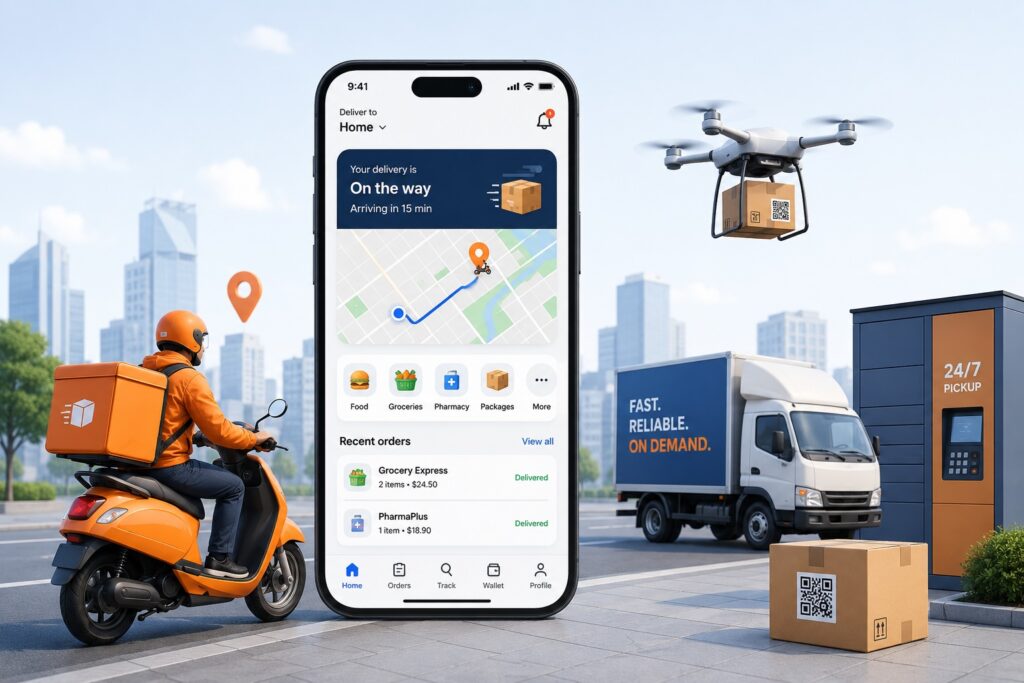
Drone and autonomous delivery. Last-mile drone delivery is moving from pilot to limited production in select markets. Sub-hour windows, real-time aerial tracking, and contactless drop-off are compelling for time-sensitive categories. For most businesses, this is a medium-term planning consideration rather than an immediate build priority.
Scale with dedicated teams of top 1% software experts across 15+ global hubs to double development velocity while maintaining cost efficiency.
Talk to an expertThe technology stack for e-commerce apps
You don’t need to own every stack decision, but understanding the tradeoffs helps you challenge your team and have more productive conversations with partners.
Mobile: true native vs. cross-platform. Native (Swift/Kotlin) delivers the best performance and device integration. Cross-platform (Flutter, React Native, Kotlin Multiplatform) lets one team cover both platforms from a shared codebase. The performance gap between the two has narrowed considerably over the years, though it still exists. Native earns its premium cost when the app relies heavily on device-specific hardware or when engagement metrics at scale justify the investment. Cross-platform is a sound default for most standard e-commerce builds.
Backend: REST vs. GraphQL. REST (Representational State Transfer) is simpler and well-understood. GraphQL lets clients request exactly the data they need — valuable for mobile clients that need to keep payloads small. GraphQL tends to pay off when multiple client types (mobile, web, kiosk) consume the same API with different data needs.
Architecture: microservices vs. modular monolith. Distributing the system into independently deployable microservices scales well and lets separate teams work without coordination overhead — but adds operational complexity. A modular monolith keeps everything in one deployable unit with clean internal boundaries. For most teams on their first serious e-commerce build, the monolith is the simpler and more pragmatic starting point.
Integration ecosystem. Your app will rely on external services: payment gateways (Stripe, Adyen, Braintree), tax calculation (Avalara), shipping carriers, CRM/ERP (Salesforce, SAP, NetSuite), analytics (Firebase/GA4, Mixpanel, Amplitude), and experimentation platforms (Optimizely).
When working on integrations, keep them loosely coupled with clear API contracts. Use idempotency on payment and order endpoints. Apply message queues for retry logic. Build for graceful degradation when downstream services are slow or unavailable. These decisions have direct business consequences: for instance, they determine whether a payment gateway outage takes down the entire checkout process or only affects one payment method.
Security, compliance, and privacy
Security and compliance define the operational risk boundary of e-commerce systems, directly shaping exposure to financial loss, regulatory penalties, and customer trust erosion. According to IBM Security, the average cost of a data breach reached $4.4 million in 2025, with retail and e-commerce consistently among the most targeted sectors due to the combination of payment data, identity data, and high transaction volume.
For e-commerce application development, this makes security, privacy, and compliance architectural inputs. They influence system design, data handling, and third-party services integration from the outset.
Payment Card Industry Data Security Standard (PCI DSS)
PCI DSS defines how organizations must handle cardholder data. In most modern e-commerce architectures, the key design decision in this context is to reduce scope rather than assume full compliance ownership.
This significantly reduces compliance burden, since systems that do not store or transmit raw card data fall within a lighter PCI DSS compliance scope.
General Data Protection Regulation (GDPR) and California Consumer Privacy Act (CCPA)
GDPR in the European Union and CCPA in the United States govern how personal data is collected, stored, and processed.
For e-commerce systems, this translates into concrete engineering requirements: explicit consent capture, data minimization, user identity traceability across systems, and the ability to fulfill requests for data access, correction, and deletion. These obligations also extend to third-party integrations such as analytics, email marketing, and customer support tools.
3-D Secure (3DS)
3D Secure 2.x (3DS2) is mandatory for most card transactions in Europe and recommended globally for high-risk purchases. Checkout needs to handle both challenge flows (customer prompted to authenticate) and frictionless flows (authentication happens silently). Poorly implemented 3DS is a meaningful conversion drag.
App Store and Play Store requirements
Apple and Google both require privacy labels and data safety disclosures that accurately reflect your app’s data practices. These requirements change over time. Include a privacy disclosure review in every release checklist — App Store review can delay a launch when submissions are non-compliant.
Personally Identifiable Information (PII) handling
Encrypt personal data in transit and at rest. Minimize what gets logged. Rotate credentials on a schedule. Run dependency scans regularly. This isn’t glamorous work, but it’s where most breaches and regulatory incidents begin.
Risks executives most often underestimate
Security and compliance risks are broadly understood. The operational and technical risks outlined below tend to receive less attention in early planning—and cause greater damage as a result.
- Scalability under peak load. Black Friday and flash sales can generate traffic 10–50× above normal. Systems that handle regular volume without issue can collapse under peak load — particularly search, inventory checks, and checkout. Load testing against realistic peak profiles is the only reliable way to find out before it matters.
- Integration brittleness. Every external service your app depends on — a payment gateway, a tax provider, a shipping carrier, a CRM — will experience an outage at some point. Whether that outage becomes your problem depends on how your team designed for it. Timeouts, retries with exponential backoff, and circuit breakers are the defenses. In vendor reviews, don’t just ask about uptime SLAs — ask what your app does when they go down.
- Catalog and data integrity. Poor product data results in broken search results, incorrect pricing, and missing product variants. The impact is rarely visible in dashboards but shows up as abandoned carts and declining conversion rates. Maintaining data quality requires import validation rules, automated integrity checks, anomaly monitoring, and a clear process for merchandising teams to flag issues.
- Search quality and relevance. A customer who searches for “running shoes” and gets irrelevant results doesn’t file a ticket — they bounce. Synonym management, boost rules, and relevance tuning informed by behavioral analytics are ongoing operational responsibilities, not a setup task.
- Release risks. App Store reviews average 24–48 hours but can extend to weeks for updates that touch permissions, privacy disclosures, or compliance-sensitive flows. SDK deprecations and privacy policy changes can trigger unexpected review delays. Teams without a structured release checklist encounter these surprises at the worst possible time.
Budget overruns. A significant share of e-commerce app builds exceed their original budget. The root causes are consistent: integration complexity underestimated, scope changes mid-build, discovery phases too short, and post-launch costs (such as maintenance, infrastructure, and compliance) not included in the original plan. None of this is unpredictable, but it requires honest budgeting upfront.
E-commerce app development best practices
Knowing the risks is only half the equation. The following practices are what consistently separate teams that deliver reliable, high-performing apps from those that spend their time in remediation mode.
- Treat discovery as a critical step. Skipping or shortening discovery is one of the most reliable ways to overspend. The hours invested in understanding users, validating assumptions, and scoping integration complexity are returned many times over during development — where changes are far more expensive.
- Ground design decisions in real data. User-centered design isn’t just a methodology; it requires actual evidence. Personas, usability tests, competitive audits, and behavioral analytics should drive every significant UX decision. Intuition is a starting point, not a substitute.
- Build for performance from the start. E-commerce systems degrade predictably as data accumulates, traffic grows, and features compound. Designing for performance (e.g., caching, query optimization, load distribution) from the beginning is almost always cheaper than retrofitting it later. The same applies to third-party integrations: plan for replacement, not permanence.
- Invest in security early. Just like performance, security is significantly cheaper to build in than to bolt on. Authentication, tokenization, encryption, and dependency management should be treated as non-negotiable from day one, not deferred to a later phase. Most breaches exploit decisions made early in a build.
- Maintain continuously, not reactively. OS updates, SDK deprecations, and third-party API changes don’t wait for convenient timing. A structured maintenance cadence — dependency reviews, security patches, performance monitoring — keeps technical debt manageable and prevents small issues from compounding into incidents.
- Instrument analytics before you need them. Event tracking and behavioral data compound in value when you instrument them early and continuously refine them. Teams that build analytics into the app from launch — rather than layering it on later — have a structural advantage: richer data, longer history, and fewer blind spots when they need to make decisions.
- Adopt AI where it creates measurable impact. AI works well in e-commerce when applied to problems with sufficient data and clear feedback loops: recommendation engines, search ranking, demand forecasting, fraud detection, customer service triage. Apply it where the impact is measurable; avoid it where it adds complexity without clear return.
Build for efficiency, not just features. Velocity matters, but so does sustainability. Using nearshore or offshore resources for experimental features, maintenance work, and lower-criticality tasks keeps costs manageable without sacrificing quality on core functionality. Automating repetitive workflows (e.g., testing, deployments, data pipelines) compounds over time. And retiring underperforming features reduces the surface area your team has to maintain.
Development steps — from concept to live
Step 1. Market and product research
This phase exists to reduce the risk of building the wrong thing. Good discovery includes competitive analysis, user persona development, and early feasibility validation of critical product and technical assumptions. The output is a shared understanding of the problem — not a feature list.
Step 2. Scoping and roadmap
Discovery translates into a concrete scope. Define the MVP (the smallest thing worth shipping), prioritize features, set release milestones, and align on KPIs — conversion rate, AOV, D1/D7/D30 retention, checkout completion — before any code is written. If the team can’t agree on what success looks like, it won’t know whether it got there.
Step 3. UX/UI design
Design in e-commerce is a performance discipline. Every friction point in the browse-to-checkout journey affects conversion. Deliverables should include information architecture, wireframes, high-fidelity prototypes, a design system, and accessibility specifications aligned with WCAG 2.1 Level AA. User-testing key flows, especially checkout and search, before development begins is inexpensive compared to rework after launch.
Step 4. Architecture and technical planning
Before writing application code, the team needs to document foundational decisions: stack selection, database schema, integration contracts, CI/CD setup, and environment strategy (dev, staging, production). Time invested here reduces integration surprises during development.
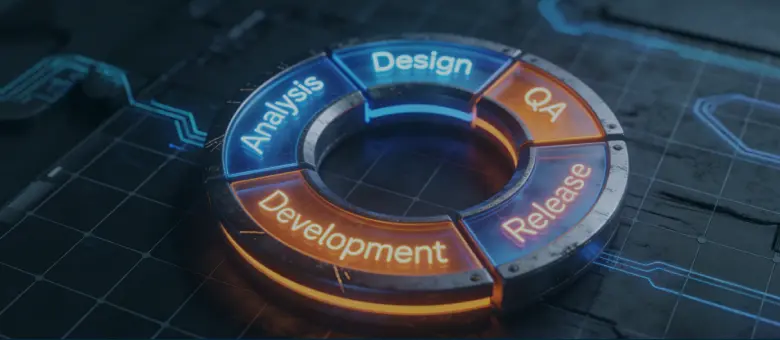
Step 5. Development
Work proceeds in iterative sprints, typically lasting 1 to 4 weeks. Mobile, backend, and integration tracks run in parallel, each delivering a testable increment. Agree on API contracts before client-side implementation begins. Feature flags enable safe rollouts and prevent incomplete features from reaching users.
Step 6. Testing
A production-grade app requires testing across multiple dimensions: core flow coverage (cart, checkout, order management), cross-device and OS version matrix, load and soak testing at peak profiles, payment sandbox and 3DS scenarios, security testing of auth flows, accessibility testing with screen readers, and App Store compliance checks. Skipping any of these has shipping implications.
Step 7. Launch
App Store and Play Store submission requires complete metadata, screenshots, privacy disclosures, and compliance sign-off. Have a marketing plan ready — apps don’t get discovered automatically. A phased rollout (releasing to a percentage of users first) limits exposure to any issues that testing didn’t catch.
Step 8. Post-launch maintenance and upgrades
Running an e-commerce app is ongoing work as dependencies and OS versions change, SDKs deprecate APIs, and new security risks emerge. In most cases, performance can also degrade as data accumulates. Budget for this from the start — typically 15–20% of the initial build cost per year.
Step 9. Feedback collection and continuous improvement
The app that ships on launch day should not be the app customers use six months later. Analytics, A/B testing, user research, and feedback channels feed a continuous improvement loop. Instrument the app to surface where customers drop off and use that signal to drive the next iteration. The best e-commerce apps weren’t built in one shot — they were gradually developed, measured, and refined.
Costs and timelines — key cost drivers and build scenarios
Most cost estimation errors in e-commerce app development come not from engineering execution, but from scope definition and integration assumptions.
Four variables consistently determine the final cost: scope complexity, build approach, number and depth of integrations, and team geography. Each of these has compounding effects. For example, a seemingly small requirement, such as multi-region pricing, often cascades into changes across the catalog structure, checkout logic, tax calculation, and analytics.
Typical e-commerce build profiles
These variables rarely translate into cost linearly. Instead, they shape a set of recurring build profiles that are more useful than fixed-pricing benchmarks for evaluating e-commerce application development services.
These cost ranges reflect a blended delivery model combining offshore, nearshore, and in-house engineering with senior technical oversight. Final pricing varies primarily based on integration complexity and team composition rather than raw engineering hours alone.
1. Single-region commerce app or MVP
In scenarios like this, the goal is to reach the market quickly while minimizing implementation risk. The scope typically includes onboarding, product catalog, search, product detail pages, cart and checkout, order tracking, push notifications, basic analytics, and a single payment gateway.
- Engineering effort: 1,600–2,200 hours
- Timeline: 3–4 months
- Team load: 3–4 contributors
- Cost range: ~$80,000–$180,000
Variation at this level is primarily driven by how much functionality you build from scratch versus assemble using existing platform components. The complexity of design and integrations required for the initial release also widens the estimation brackets.
2. Standard multi-region commerce app
This profile extends into operational and commercial complexity: loyalty programs, coupons, product reviews, multi-currency support, tax and shipping integrations, and returns management.
- Engineering effort: 3,000–4,500 hours
- Timeline: 5–7 months
- Team load: 4–6 contributors
- Cost range: ~$160,000–$380,000
At this stage, integration work becomes the dominant cost driver. Payment providers, tax engines, and fulfillment systems introduce variability that directly impacts both timeline and engineering effort.
3. Advanced retail or enterprise commerce platform
This profile includes omnichannel capabilities such as BOPIS (buy online, pick up in store), real-time inventory across locations, advanced personalization, fraud detection systems, and experimentation infrastructure.
- Engineering effort: 6,000–9,000 hours
- Timeline: 8–12+ months
- Team load: 6–10 contributors
- Cost range: ~$350,000–$750,000+
At this level, architecture decisions (particularly around scalability, modularity, and event-driven systems) become as influential as feature scope in determining both cost and long-term maintainability.
Hidden costs after launch
The initial build cost is only part of the total investment. Ongoing expenses can include infrastructure, platform fees, maintenance, compliance, as well as product and engineering capacity for continuous improvement and experimentation.
| Cost category | What it includes | Cost structure & range |
|---|---|---|
| Infrastructure | Hosting, CDN, databases, monitoring, logging, security tooling | ~$2,000–$10,000/month depending on traffic and architecture |
| Platform fees | Shopify, BigCommerce, payment processor fees | Scales with revenue and transaction volume |
| Maintenance | Bug fixes, OS updates, SDK upgrades, dependency management | ~15–20% of initial build cost annually |
| Compliance | GDPR/CCPA updates, PCI DSS scope maintenance, security audits | Variable, increases with scale and regions |
| Product & engineering capacity | Continuous improvements, A/B testing, feature iterations | Ongoing strategic investment, not optional at scale |
Pre-launch checklist
Successful e-commerce launches are rarely defined by development alone. They depend on whether business, technical, and compliance requirements have been fully aligned before release.
Business and product requirements:
- Target user personas documented and validated
- Core user journeys mapped and tested
- Success metrics (conversion, retention, AOV) defined and instrumented
- MVP scope agreed and signed off
Technical and architectural requirements:
- Load testing completed against peak traffic profiles
- Integration test coverage for all third-party services
- CI/CD pipeline operational with automated tests
- Feature flags in place for rollout control
- Observability (logging, alerting, error tracking) active in production
Legal and compliance requirements:
- PCI DSS scope confirmed and tokenization in place
- GDPR/CCPA consent flows live and consent records stored
- App Store privacy labels and Google Play data safety form accurate and approved
- Terms of service and privacy policy current and accessible in-app
Content and data requirements:
- Product catalog complete, accurate, and QA’d
- Search index populated and relevance tuned
- Localization content reviewed by native speakers (if applicable)
- Customer support help center content live
How to choose an e-commerce mobile app development company
Most e-commerce companies work with external partners for at least part of the build — a full-service agency, a nearshore development team, or individual specialists brought in to fill capacity gaps.
In-house vs. agency vs. dedicated teams. In-house teams provide the strongest long-term continuity and deep product ownership, but they require significant time and investment to build and scale. Agencies bring structured delivery capabilities and full cross-functional teams, but your project competes for attention alongside other clients. Dedicated teams sit between the two: you get long-term, stable engineering capacity aligned to your roadmap, while the partner handles hiring, retention, and operational overhead.
What to look for. Domain depth matters more than general engineering skill. A team that has built and maintained ten e-commerce apps understands the catalog, payments, and fulfillment edge cases that a generalist team will encounter the hard way. Look for demonstrated experience with your specific integrations. Ask for references from clients who are 12+ months post-launch — that’s when the support relationship is tested.
Red flags. Be cautious of partners who can’t explain their architecture decisions plainly, skip the hard questions during scoping, have no clear process for handling scope changes, or quote timelines dramatically shorter than everyone else’s. Short timelines usually mean scope that isn’t being counted.
Questions worth asking:
- Can you show me a production e-commerce app you’ve built and currently support?
- How do you handle integration failures in production?
- What does post-launch support look like, and at what cost?
- How do you manage scope changes mid-project?
- Who specifically will work on our account, and what’s their background?
Bottom line and takeaways
- The success of e-commerce app development services is determined less by execution choices later in the project and more by early decisions around build approach, architecture, and integration scope. These choices compound across cost, timeline, and user experience.
- Most high-performing e-commerce apps are defined not by feature count, but by focus. Companies that anchor their app around a clear outcome — conversion, retention, loyalty, or omnichannel experience — consistently outperform those that try to replicate every competitor capability.
- You should treat the build strategy as a staged decision. SaaS platforms enable speed and standardization, while custom and headless approaches unlock long-term flexibility at the cost of higher upfront complexity and investment.
- Delivery risk is driven primarily by integration complexity, data quality, and scalability planning rather than core UI development. These areas require executive attention early, not remediation after launch.
- A well-scoped discovery phase is often the highest-leverage investment in the entire lifecycle. It reduces rework, stabilizes budgets, and aligns product, engineering, and business stakeholders before development begins.
Choosing the right development partner often determines whether these principles translate into a successful product or remain a well-designed plan.
Teams like AgileEngine bring dedicated e-commerce engineering expertise across architecture, mobile development, and system integration, supporting companies from early discovery through to scalable production releases with reduced execution risk. If you are evaluating your next e-commerce app development initiative, contact us to explore how we can help accelerate delivery, reduce uncertainty, and build a foundation for long-term growth.
Boost development efficiency without breaking the budget. Our dedicated teams offer 2X cost savings, delivering in-house-level quality
Let’s chatFAQ
Development costs range from roughly $80,000 for a single-region MVP to $750,000+ for an advanced enterprise built with omnichannel features and personalization infrastructure. Platform-based builds (Shopify, BigCommerce) can be significantly cheaper — $3,000–$40,000 in development fees — with ongoing subscription costs. The right budget depends entirely on your goals, scope, build approach, and team.
A well-scoped MVP typically takes 3–4 months. A standard multi-region app takes 5–7 months. Complex enterprise builds run 8–12+ months. These timelines assume adequate discovery and scoping before development begins.
Start with Shopify if you need to launch quickly and if you’re comfortable with the web (or a PWA) being your main e-commerce channel. Shopify is also a solid starting option if your feature requirements are standard and your team doesn’t have dedicated engineering capacity. Move toward a custom or headless build when platform constraints are limiting your roadmap, when transaction fees at scale make a custom build financially justified, or when you have UX requirements that no platform theme can satisfy.
Integration complexity (third-party services sometimes don’t behave as documented), search relevance tuning (making search actually useful takes ongoing work), checkout edge cases (tax, shipping, and payment failure handling are significantly more complex than the happy path), and App Store compliance and review timelines.
A credible MVP on a custom stack starts around $80,000. A platform-based build can be done for less, but with corresponding constraints on flexibility. Below $20,000, you’re in DIY or low-code territory — viable for validation, not for a production experience at meaningful scale.
AI has practical applications across the stack today: personalized product recommendations and search ranking, demand forecasting and inventory optimization, fraud detection, AI-powered customer service triage, and agentic features that act on behalf of customers (auto-applying coupons, proactive restock reminders). The companies getting the most value from AI in e-commerce are the ones that instrumented their data pipelines well early — the models are only as good as the behavioral data they’re trained on.










![A smartphone and a tablet with monetization elements (banner ad and in-app purchase button) displayed on the screen]](https://dliwjjrllagqi.cloudfront.net/wp-content/uploads/2026/03/How-Do-Free-Apps-Make-Money_-Monetization-Explained.webp)